-p runs without a chat window
One prompt in, one result out. Add -c to continue the last conversation in that folder instead of starting fresh.
Purffle / Claude Multi / Guides
Long refactors, test fixing and backlog chores do not need you watching. Here is what stops an unattended run, how to set one up by hand, and how to get through the usage limit without waking up.
You start a long task, go to bed, and in the morning find it stopped twenty minutes after you left. It is almost always one of four things:
An overnight setup has to deal with all four. None of them needs a hack.
A prompt you would type while watching ("fix the failing test") is too thin for eight hours alone. Give Claude a queue and a finish line instead:
TODO.md with one checkbox per job. Each run does the first unchecked item and ticks it off. The plan survives between runs, so every run can start from a fresh, small context.git switch -c overnight before you leave. Commits make each step easy to review, and easy to undo.Claude Code has a non-interactive mode: claude -p "…" runs one prompt, prints the result and exits. Wrap it in a loop and it becomes a night shift. On macOS or Linux:
#!/bin/sh
# overnight.sh — one fresh Claude Code run every 20 minutes
cd ~/code/my-project || exit 1
while true; do
  claude -p "Open TODO.md. Do the first unchecked item, run the tests,
commit if they pass, tick the item off, then stop." \
    --permission-mode acceptEdits \
    --allowedTools "Bash(npm test) Bash(git add *) Bash(git commit *)"
  sleep 1200
done
Then keep the computer awake for as long as the script runs. On macOS:
caffeinate -i ./overnight.shOn Linux, systemd-inhibit ./overnight.sh does the same. On Windows, set Sleep to Never while plugged in, in Settings, under System and Power, and run the loop from PowerShell or WSL.
-p runs without a chat windowOne prompt in, one result out. Add -c to continue the last conversation in that folder instead of starting fresh.
--permission-mode acceptEditsFile edits go ahead without asking. Commands still need approval unless they are on the allow-list.
--allowedTools is the allow-listOnly the commands you name run unattended. Keep it short: your test command and git, not every shell command.
--dangerously-skip-permissions lets Claude run anything without asking. Claude Code's own help recommends it only for sandboxes with no internet access. On your everyday machine, use an allow-list instead.The loop above has one weak spot. When the account hits its limit, every run until the reset fails straight away and the loop just keeps knocking. With one subscription, that is simply the ceiling: you get as much work as one account allows, and the rest of the night is spent waiting.
If you have more than one Claude subscription of your own, the waiting can go away. Each account has its own limit, so while one resets another can work. Doing that by hand means a separate config folder per account and a script that knows which one is free (the setup is here). This is the part Claude Multi automates.
Claude Multi's 24/7 auto-loop is the same idea as the shell loop, built around several accounts. Give it one prompt and a project folder, pick the accounts, and start it.
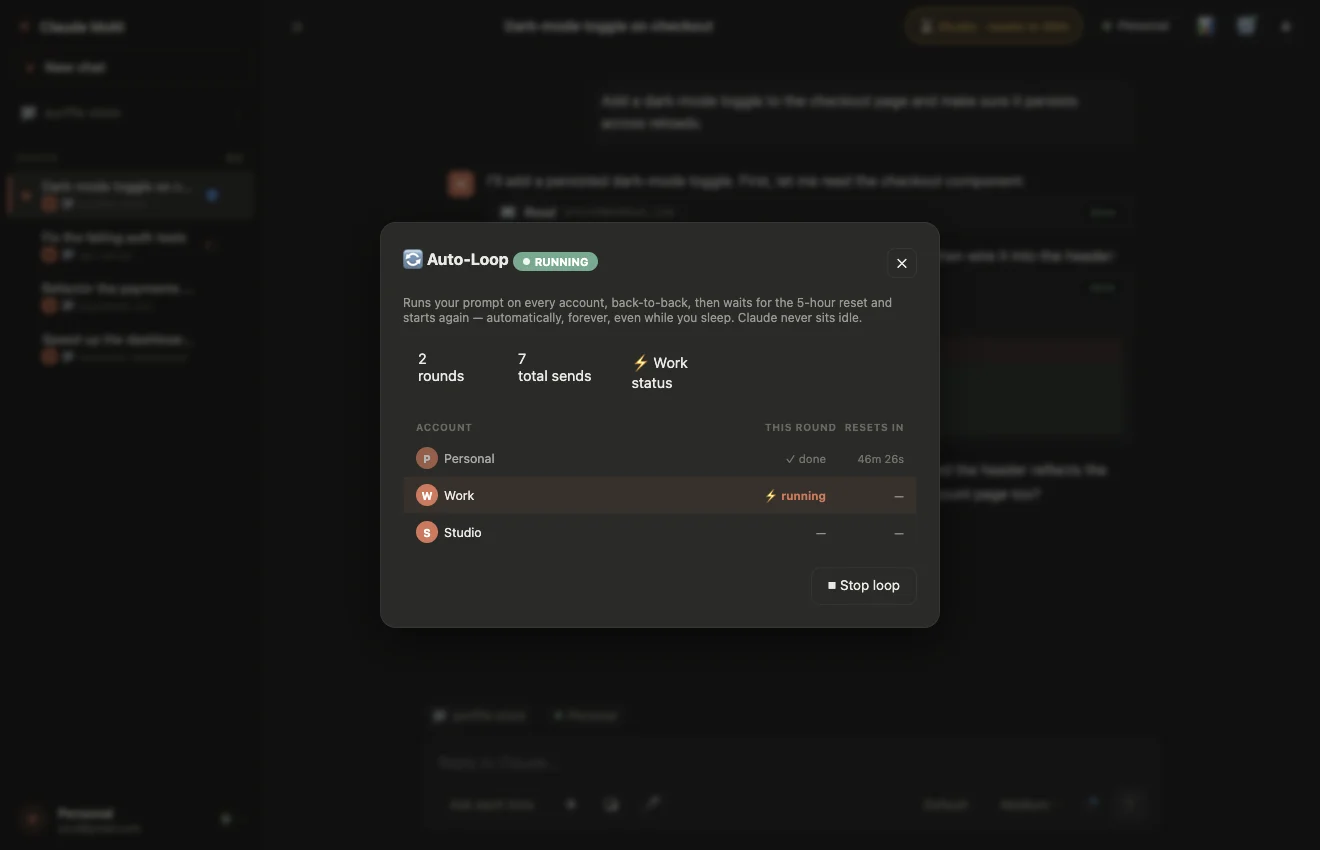
Each account runs the prompt in a new chat, so the context stays small and every turn costs less.
When one account's turn ends, or it hits its limit, the loop moves to the next account in the round.
When every account has had its turn, it waits for the soonest reset and starts a new round. Overnight, or over a weekend.
While the loop runs, Claude Multi stops the computer from sleeping. On battery it only does so if you allow it.
The safety net is in the same place as in the terminal. Choose a permission mode before you leave: in Ask mode, a turn that needs approval waits for you. Step and spend caps stop a runaway turn, and the loop runs until you press Stop.
Shell loop with claude -p | Claude Multi auto-loop | |
|---|---|---|
| Cost | Free | From $5 a month |
| Setup | A script, an allow-list, a keep-awake command | One prompt, one folder, tick the accounts |
| At the usage limit | Keeps retrying until the reset | Moves to the next account; waits only when all are used |
| Several accounts | Possible with extra scripting | Built in |
| Keeps the computer awake | With caffeinate or systemd-inhibit | Automatic while it runs |
| Seeing progress | Read the log in the morning | Round, current account and countdown on screen |
If you have one account and like the terminal, the shell loop is all you need. If you have several subscriptions and want them all working through the night, that is what the auto-loop is for.
Yes. Claude Code runs on your own computer, so it can work unattended as long as the computer stays awake, nothing is waiting for your approval and the account has usage left. Headless mode (claude -p) in a shell loop does it by hand; Claude Multi's auto-loop does it across several accounts.
Skipping them entirely is risky. Claude Code's own help recommends --dangerously-skip-permissions only for sandboxes with no internet access. A safer setup is --permission-mode acceptEdits plus a short --allowedTools list, on a separate git branch you review in the morning.
With a single account the work stops until the limit resets, which can be up to five hours. Claude Multi's auto-loop moves on to the next account you selected, and when every account has had its turn it waits for the soonest reset and starts a new round.
Yes. Claude Code runs locally, so a sleeping computer means a paused task. On macOS caffeinate -i and on Linux systemd-inhibit keep it awake while a command runs. Claude Multi keeps the computer awake by itself while the auto-loop is running; on battery it only does so if you allow it. The display can still turn off.