v2.0.0 out now·Free & open source·Any LLM·320+ free voices·Word-synced captions·Auto-upload & schedule·macOS · Windows · Linux · Docker·No GPU needed·A Purffle app · built in Chennai·v2.0.0 out now·Free & open source·Any LLM·320+ free voices·Word-synced captions·Auto-upload & schedule·macOS · Windows · Linux · Docker·No GPU needed·A Purffle app · built in Chennai·
v2.0.0 — newFree foreverOpen sourceNo GPU
The free AI YouTube Shorts generator.
PurffleShorts writes the script with any AI model, voices it with a free neural voice, finds footage for every sentence, adds captions synced to each word, renders a 1080×1920 video and uploads or schedules it on YouTube. Then it does the next one.
Any topicany LLMNeural voiceword captionsStock or AI footageffmpeg renderAuto-uploadon autopilotAny topicany LLMNeural voiceword captionsStock or AI footageffmpeg renderAuto-uploadon autopilot
01 App tour · v2.0.0
Real output, real app.
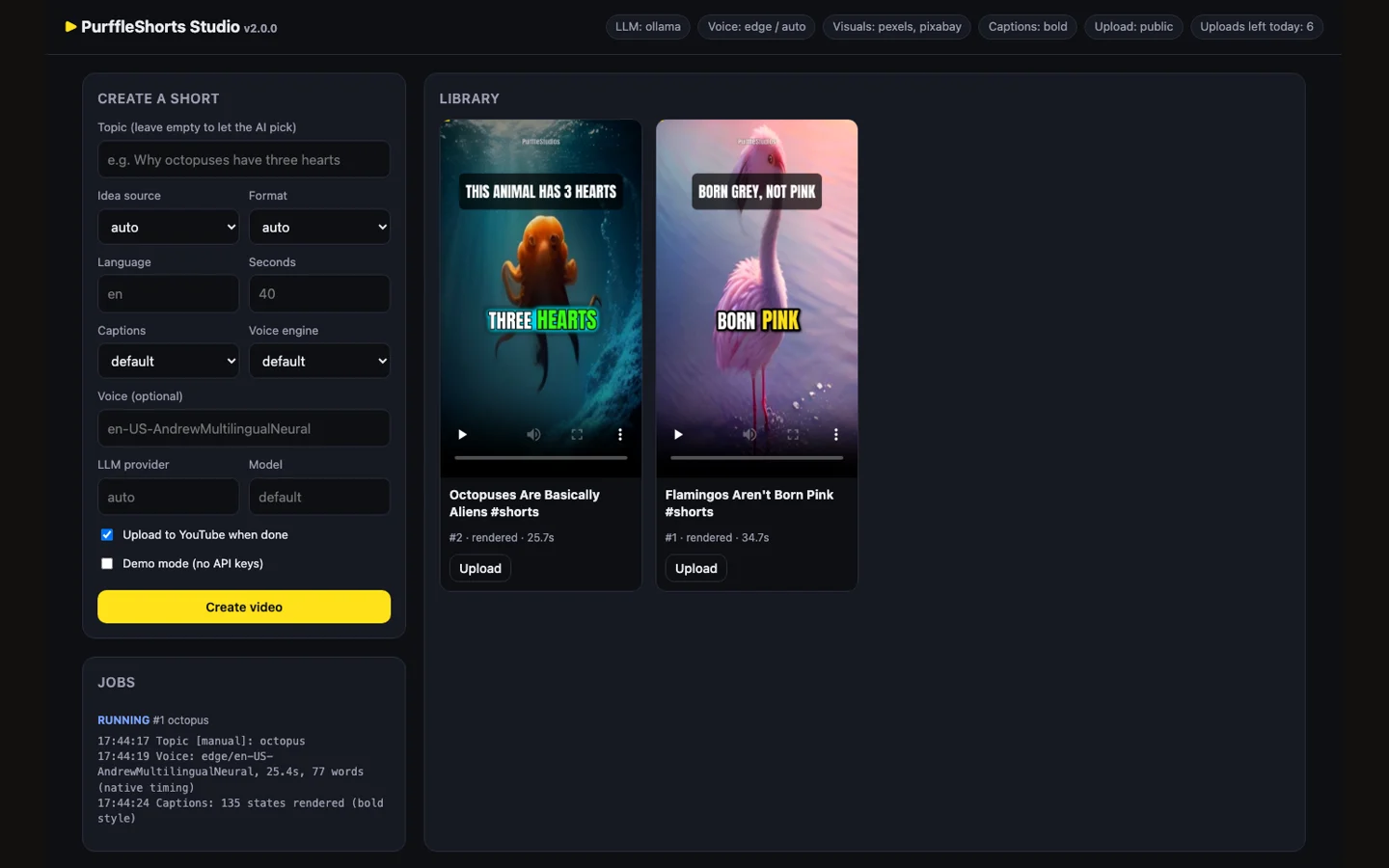
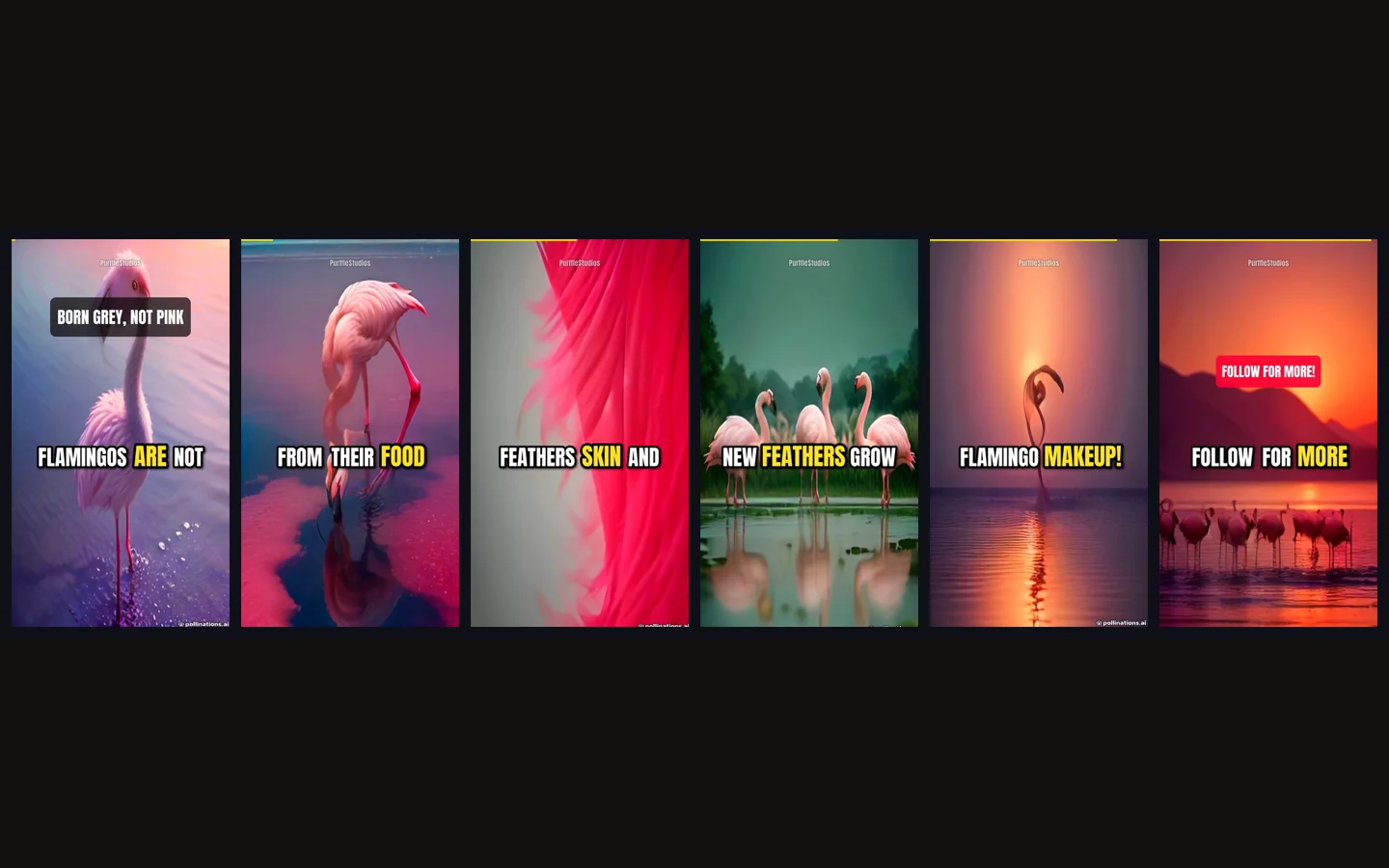
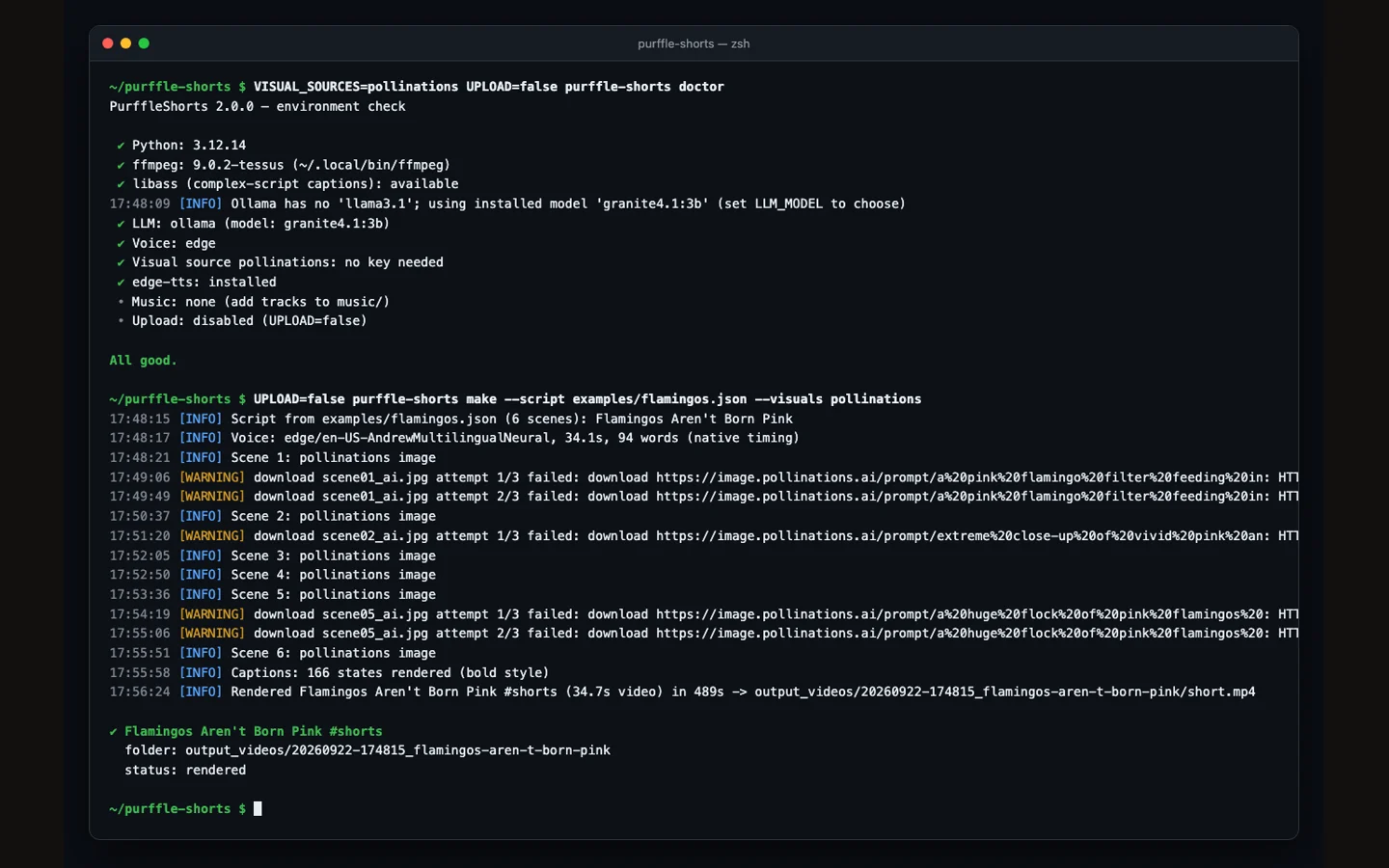
The Studio dashboard, the command line, and frames from a real render — made with no API keys, using free voices and free AI images.
Studio — the local dashboard
Create Shorts from a form, watch the job log, preview renders and upload — all in your browser, on your machine.
01 / 04
02 Features
A whole Shorts channel, on autopilot.
Everything between an idea and a published Short, in one Python app. No MoviePy, no ImageMagick, no GPU.
01 — CORE
One structured AI call writes the whole Short
Hook, scenes, a footage search and image prompt per scene, title, description, hashtags, tags and category — from GPT, Claude, Gemini, Llama via Ollama, DeepSeek, Grok, Mistral or any OpenAI-compatible API, with automatic fallback.
12 providers8 formatsor your own script
02 — VOICE
320+ free neural voices
75 languages with word-level timing, no key. Or OpenAI TTS, ElevenLabs, Kokoro, Coqui.
03
Footage for every scene
A stock search per scene (Pexels, Pixabay), portrait-first, never reused — or AI images.
04
Word-synced captions
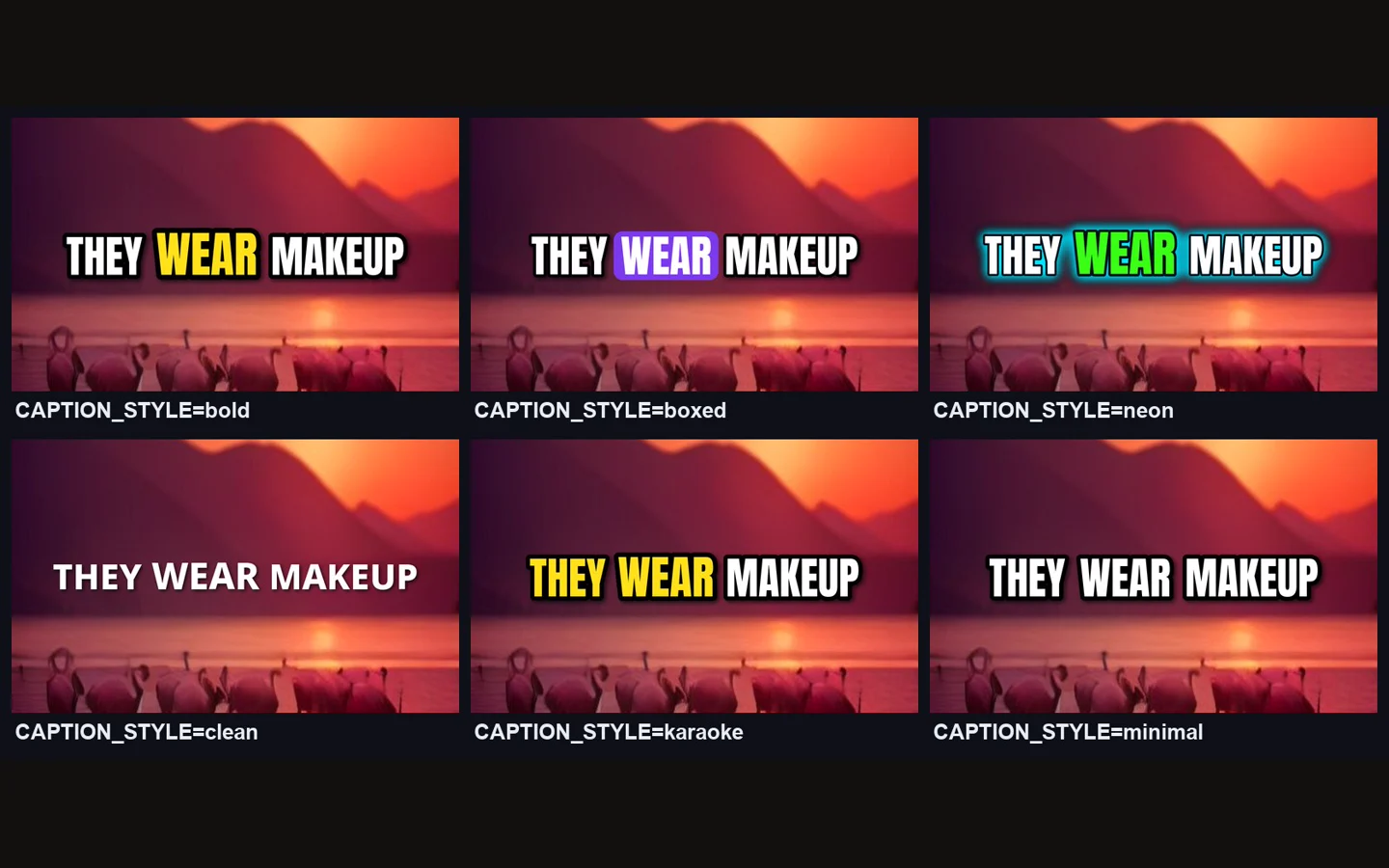
Each word appears as it is spoken, current word highlighted. Six styles.
05
Sound that is finished
Music ducks under the voice; loudness normalised to −14 LUFS.
06 — PUBLISH
Upload or schedule to YouTube
Publish now or slot each video into your next free time slot — quota-aware, with AI-content disclosure, playlists and privacy options.
07 — WORKFLOW
Autopilot, batches, channels
Run forever, make one-offs, render bulk batches in parallel, or run several channels from separate settings files.
08
Ideas that don't repeat
Your niches, Google Trends, Wikipedia "On this day", Reddit TIL or your list.
09
Cross-post ready
Every video also gets a cover image, SRT subtitles and a metadata file.
10
Runs on your computer
macOS, Windows, Linux or Docker. You pick every model and key.
03 AI models
12 providers · automatic fallback
Bring any AI model.
Use the model you already pay for — or a free local one. If a provider fails, PurffleShorts falls back to the next.
01OpenAI, Anthropic Claude, Google Gemini, Groq, OpenRouter, DeepSeek, Mistral, Together AI, xAI Grok.
02Local and free: Ollama and LM Studio, with model checks before you render.
03Any OpenAI-compatible URL for everything else.
04No LLM at all: write a script yourself and render it with --script.
Python 3.10–3.13 and ffmpeg. The first render needs no API keys at all.
01
Get it
Download the zip below (or git clone) and run pip install -e . inside the folder.
02
Check
Run purffle-shorts doctor — it checks Python, ffmpeg, voices and any keys you set.
03
Make
Run purffle-shorts make for one Short, or start autopilot and let it keep publishing.
Worth knowing
Upload uses the official YouTube Data API with your own Google project, and stays inside YouTube's daily quota. Mark AI-generated content as such — PurffleShorts sets YouTube's disclosure flag for you — and follow the platform's rules for your channel.
05 Compare
Why not a paid Shorts tool?
An honest look at the usual options.
PurffleShorts
Paid AI video sites
Editing by hand
Price
Free (pay only for keys you choose)
Monthly subscription
Your time
Choice of AI model
12 providers + local
Theirs
—
Word-synced captions
✓
Usually
Manual
Auto-upload & scheduling
✓
Sometimes
✕
Runs on your computer
✓
✕
✓
Watermark
None
Often on free plans
None
Open source
✓ MIT
✕
—
06 Download · v2.0.0
Get PurffleShorts.
PurffleShorts is a Python app, so there is no installer — download the source, install it with pip, and run it. Or use Docker.
Yes — free and open source under MIT. The first Short can be made with no keys at all (free neural voices and free AI images). You only pay providers you choose to use.
Which AI models does it support?
OpenAI, Anthropic Claude, Google Gemini, Groq, OpenRouter, DeepSeek, Mistral, Together AI, xAI Grok, Ollama, LM Studio, or any OpenAI-compatible URL — with automatic fallback between them.
Do I need a GPU?
No. Rendering is a single ffmpeg pass. A 25-second Short rendered in 30–40 seconds on an Intel Mac in testing.
Can it upload to YouTube automatically?
Yes — publish immediately or schedule into your next free time slot, using your own Google project and the official YouTube Data API.
Can I use it for TikTok and Instagram Reels?
The output is a standard vertical 9:16 MP4 with SRT subtitles and a cover image, so it works anywhere vertical video does. Auto-upload is YouTube only.
What languages does it support?
320+ free voices across 75 languages, and captions in Latin, Indic, Arabic, Thai and CJK scripts.
Can I write my own script?
Yes — write or edit a script file and render it with --script, no LLM call needed.
Is automated content allowed on YouTube?
YouTube allows AI-assisted content but requires disclosure of realistic synthetic media and penalises low-effort mass-produced videos. PurffleShorts sets the disclosure flag; making videos worth watching is up to you.
08 Guides
Step-by-step guides.
Straight answers to the questions people search for — including the limitations.