Install it
Download Claude Multi from the download section. You also need Node.js 18+ and the Claude Code CLI.
Purffle / Claude Multi / Guides
Claude Code remembers one login at a time. Here is the documented way to keep several accounts signed in side by side — by hand, and with a free app that also switches for you when one runs out.
Claude Code keeps everything about you in a single configuration folder: your login, your chat sessions and your settings. Log in with a second account and it overwrites the first — so switching means logging out, logging in, and losing the conversation you were in the middle of.
The fix is not a hack. Claude Code reads an environment variable, CLAUDE_CONFIG_DIR, that tells it
which folder to use. Give every account its own folder and they stop colliding. This is the officially
documented mechanism, and it is exactly what Claude Multi uses underneath.
On macOS or Linux, add an alias per account to your shell profile (~/.zshrc or
~/.bashrc):
alias claude-work='CLAUDE_CONFIG_DIR=~/.claude-work claude'
alias claude-personal='CLAUDE_CONFIG_DIR=~/.claude-personal claude'
Open a new terminal, run claude-work, and type /login to sign in with your work account.
Do the same with claude-personal. From then on each command opens Claude Code already signed in to that
account.
On Windows (PowerShell), set the variable for the session before starting Claude Code:
$env:CLAUDE_CONFIG_DIR = "$HOME\.claude-work"; claudeThis works, and costs nothing. Its limits show up the first time an account runs out mid-task:
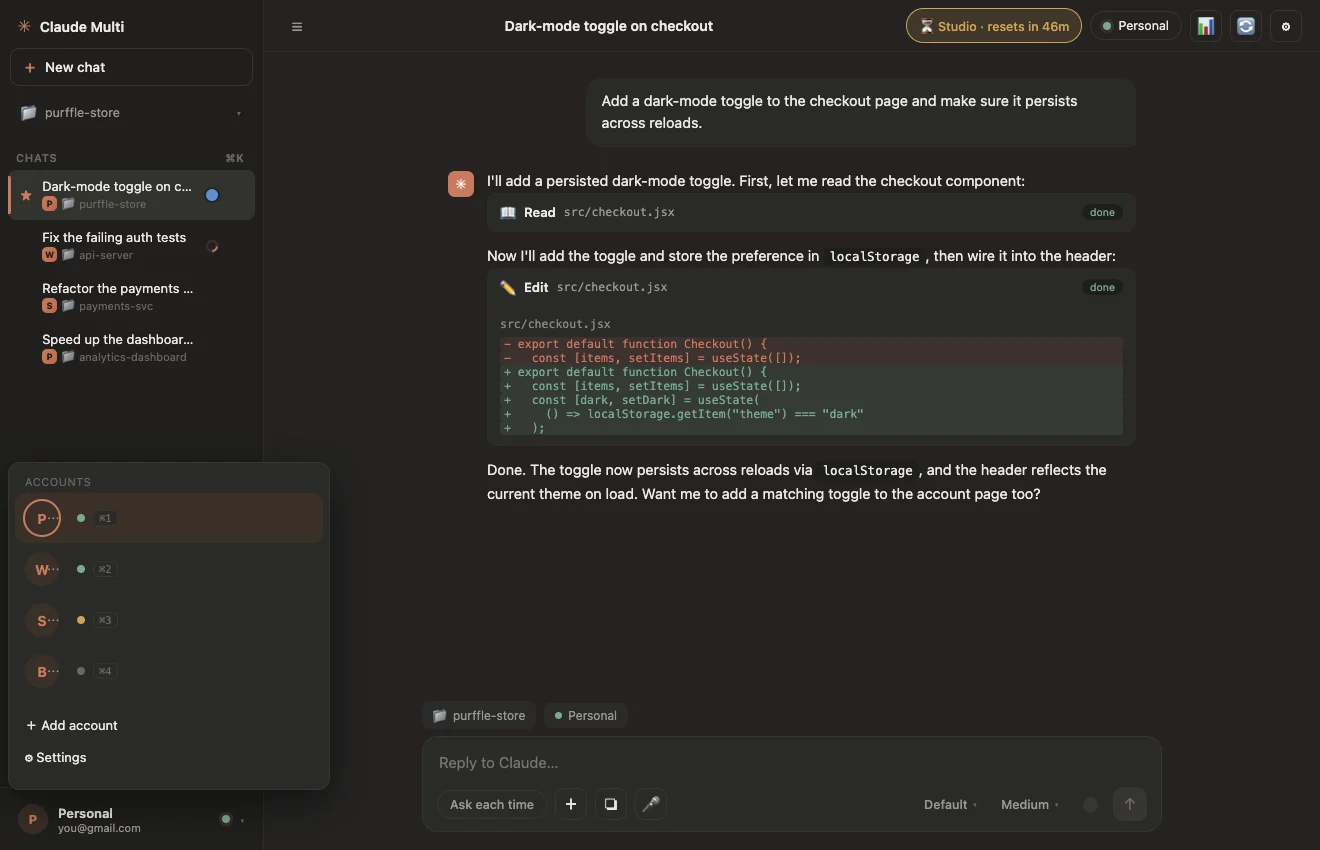
Claude Multi is a free, open-source desktop app for Windows, macOS and Linux that does the folder work for you and handles the part the manual method cannot: carrying a conversation across when an account hits its limit.
Download Claude Multi from the download section. You also need Node.js 18+ and the Claude Code CLI.
Click Add account once per Claude subscription you own. Each gets its own ~/.claude-accounts/<id>/ folder — the same CLAUDE_CONFIG_DIR mechanism as above.
The first sign-in opens claude /login in a small terminal window, because the login needs an interactive session. After that it runs quietly in the background.
Pick an account per chat, or switch with Ctrl/Cmd + 1…9. When an account hits its limit, Claude Multi copies the conversation to a free account, resumes the session there and re-sends the instruction that was cut off.
| Aliases + CLAUDE_CONFIG_DIR | Claude Multi | |
|---|---|---|
| Accounts stay signed in | Yes | Yes |
| Switch accounts | Open another terminal | One click or shortcut |
| When a limit hits | You notice, then start again elsewhere | Conversation moves to a free account automatically |
| Reset times | Track them yourself | Live countdown per account |
| Cost | Free | Free, MIT licensed |
Running several accounts is not account sharing when every account is your own subscription and every login stays on your machine. That said, Anthropic's consumer terms restrict using subscription logins in third-party tools. Read them and decide for yourself. Claude Multi is an independent project, not affiliated with Anthropic.